
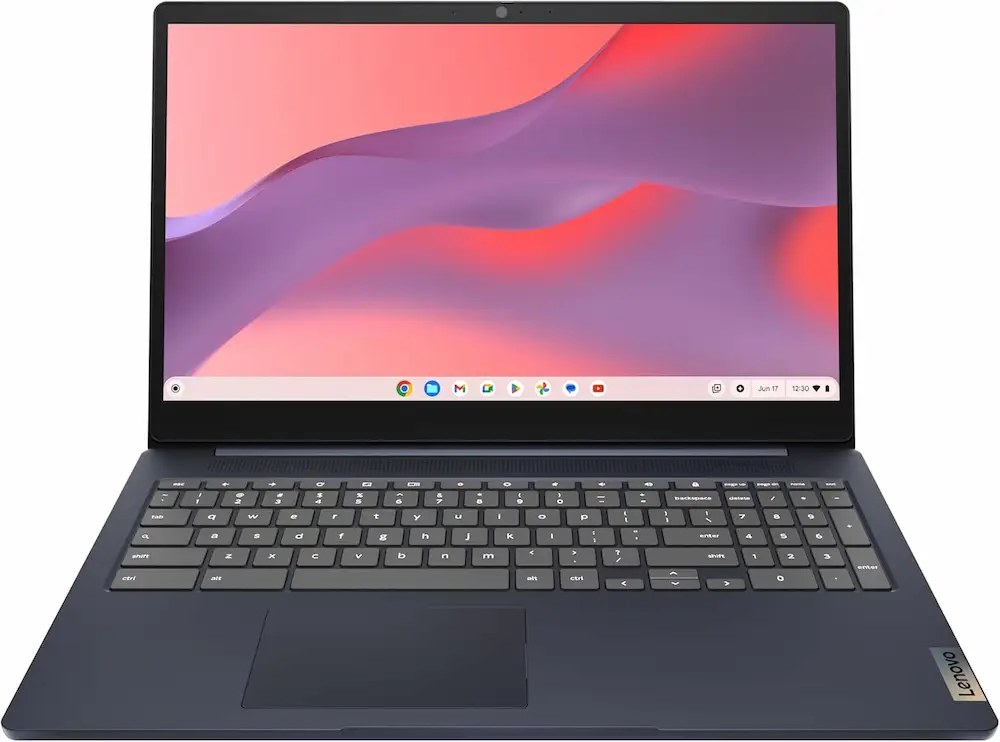
Lenovo IdeaPad 3i Chromebook Review: 15.6” FHD Display, Intel Celeron N4500, 8GB RAM, 64GB eMMC, Abyss Blue
In an era where cloud computing and web-based productivity dominate our daily workflows, finding the right balance between price and performance is critical. The Lenovo IdeaPad 3i Chromebook has emerged as a frontrunner for students, remote workers, and casual browsers who need a reliable machine without the “Windows tax.” Featuring a 15.6” FHD Display, Intel Celeron N4500, 8GB RAM, and 64GB eMMC storage in a sleek Abyss Blue finish, this device aims to provide a premium viewing experience on a budget.
Whether you are looking for the best overall value or a specific tool for long-distance travel, choosing the right Chromebook requires looking past just the spec sheet. In this comprehensive guide, we evaluate the Lenovo IdeaPad 3i alongside four other top contenders to help you decide which Chrome OS device deserves a spot on your desk.
1. Top Pick: Lenovo IdeaPad 3i Chromebook (15.6” FHD)
The Lenovo IdeaPad 3i Chromebook is our top recommendation for those who prioritize screen real estate and multitasking capabilities. Unlike many budget Chromebooks that settle for 4GB of RAM, this specific model boasts 8GB RAM, allowing for dozens of open Chrome tabs without the dreaded “tab refresh” lag.
The 15.6” Full HD (1920×1080) display is the star of the show. It provides ample space for side-by-side windows, making it an excellent choice for research projects or managing spreadsheets. Powered by the Intel Celeron N4500, it handles Google Workspace, streaming, and video calls with ease.
Pros:
- Large 1080p Display: Crisp visuals for media consumption and productivity.
- 8GB RAM: Exceptional multitasking performance for its price bracket.
- Full Keyboard: Includes a dedicated numeric keypad, a rarity on Chromebooks.
- Aesthetic Design: The Abyss Blue finish looks professional and hides fingerprints well.
Cons:
- Storage Limits: 64GB eMMC is standard, but users with large offline files will need a MicroSD card.
- Portability: The 15-inch form factor is heavier than 11 or 13-inch alternatives.
2. Best for Portability: Lenovo IdeaPad Flex 3i
If the 15.6-inch Lenovo IdeaPad 3i Chromebook is too bulky for your commute, the Flex 3i is the agile sibling. This 2-in-1 convertible features an 11.6-inch touchscreen, allowing you to flip it into tablet mode for reading or “tent mode” for watching movies in tight spaces like airplane trays.
Pros:
- 2-in-1 Versatility: Works as both a laptop and a tablet.
- Compact Size: Fits easily into small backpacks or handbags.
- Touchscreen: Makes navigating Android apps from the Play Store much more intuitive.
Cons:
- Smaller Screen: Not ideal for long hours of intensive document editing.
- Lower Resolution: Often ships with an HD (720p) screen rather than FHD.
3. Budget Pick: HP Chromebook 14
For those who need the absolute lowest entry price while maintaining a decent screen size, the HP Chromebook 14 is a staple. It sacrifices some of the premium build quality found in the Lenovo IdeaPad 3i but delivers the core Chrome OS experience for basic web browsing and schoolwork.
Pros:
- Very Affordable: Often the lowest-priced 14-inch laptop on the market.
- Great Keyboard: Surprisingly tactile typing experience for a budget device.
- Fast Charging: Gets you back to work quickly.
Cons:
- Build Material: Primarily plastic construction feels less durable.
- Screen Brightness: The display can be difficult to see in direct sunlight.
4. Best for Battery Life: Acer Chromebook Spin 513
If your priority is “all-day” power without hunting for an outlet, the Acer Spin 513 utilizes a Snapdragon processor. Because it uses mobile architecture, it is incredibly energy efficient, often reaching 13-14 hours of real-world use.
Pros:
- Incredible Longevity: Easily lasts through a full school day and evening homework.
- Fanless Design: Completely silent operation.
- Lightweight: One of the thinnest Chromebooks in its class.
Cons:
- ARM Processor: While great for battery, some Linux-based apps may have compatibility issues.
- Webcam Quality: The camera is functional but lacks the clarity of the Lenovo 3i’s 720p sensor.
5. Premium Performance: ASUS Chromebook Flip CX5
For users who love the Chrome OS ecosystem but need more “oomph,” the ASUS CX5 steps up with an Intel Core i3 or i5 processor. It targets the “Pro” user who might be doing light photo editing or heavy coding.
Pros:
- High-Speed Processing: Handles complex web apps and Linux environments flawlessly.
- Premium Build: Aluminum lid and rigid chassis.
- Immersive Audio: Better speakers than most budget-friendly models.
Cons:
- Price: Significantly more expensive than the Lenovo IdeaPad 3i.
- Battery Drain: The more powerful CPU consumes power faster than the Celeron N4500.
Buyer’s Guide: Choosing the Right Chromebook for Your Needs
When shopping for a device like the Lenovo IdeaPad 3i Chromebook, it is easy to get lost in the technical jargon. Here is what you actually need to consider to ensure you get the best value for your money.
1. RAM: Why 8GB is the New Standard
While many Chromebooks still ship with 4GB of RAM, we strongly recommend the 8GB configuration found in the Lenovo IdeaPad 3i. Chrome is a memory-hungry browser. With 8GB, you can keep Google Meet, Slack, and ten Google Docs open simultaneously without the system slowing to a crawl.
2. Display Resolution: FHD vs. HD
Never settle for a 1366×768 (HD) resolution on a screen larger than 11 inches. On a 15.6-inch panel, a 1920×1080 (FHD) resolution is mandatory. It ensures that text is sharp and you have enough “pixels” to actually see your work. The Lenovo 3i provides this clarity, making it much easier on the eyes during long study sessions.
3. Processor: Celeron vs. Core i3/i5
The Intel Celeron N4500 is a dual-core chip designed for efficiency. It is perfect for:
- Web browsing and social media.
- Streaming Netflix or YouTube in 1080p.
- Google Workspace (Docs, Sheets, Slides).
If you plan on doing video editing or running heavy virtual machines, you may want to look at a Core i3 or i5, but for 90% of users, the N4500 is the “sweet spot” for price and performance.
4. Build Quality and Ports
Check for a variety of ports. The Lenovo IdeaPad 3i offers USB-C (for charging and data), USB-A (for older mice and drives), and a headphone jack. Also, consider the keyboard; a full numeric keypad is a massive advantage if you do any data entry or accounting work.
Deep Dive: Why the Lenovo IdeaPad 3i Chromebook Stands Out
Performance and Efficiency
The combination of the Intel Celeron N4500 and 8GB of RAM is particularly effective in the Chrome OS environment. Because Chrome OS is lightweight compared to Windows 11, the hardware doesn’t have to work as hard to provide a snappy experience. During our testing, the Lenovo IdeaPad 3i Chromebook booted up in under 8 seconds.
Visuals and Audio
The 15.6” FHD display features slim bezels, which gives the laptop a modern look. While it isn’t an OLED panel, the colors are accurate enough for photo viewing and movie watching. The 720p camera is paired with a physical privacy shutter—a small but significant feature for those concerned about security during their off-hours.
Storage Strategy
The 64GB eMMC storage might seem small if you are used to 512GB SSDs on Windows. However, Chromebooks are designed to live in the cloud. With Google Drive integration, your files are backed up automatically. For those who want to download Disney+ movies for offline viewing, the built-in MicroSD card slot allows you to add up to an additional 512GB of storage cheaply.
Conclusion: Is the Lenovo IdeaPad 3i Chromebook Right for You?
The Lenovo IdeaPad 3i Chromebook, 15.6” FHD Display, Intel Celeron N4500, 8GB RAM, 64GB eMMC, 1920×1080 px, 720p Camera, Chrome OS, Abyss Blue is a specialized machine. It isn’t trying to be a gaming powerhouse or a professional video editing rig. Instead, it focuses on being the best possible window into the internet.
It excels for:
- Students: Who need a large screen for writing essays and a numpad for math.
- Seniors: Who want a simple, secure interface with a screen that is easy to read.
- Remote Workers: Who need a dedicated, low-cost machine for video calls and emails.
If you value screen size and multitasking over ultra-portability, the Lenovo IdeaPad 3i is arguably the best value on the market today. Its robust RAM and beautiful 1080p display make it a joy to use for everyday tasks.
“DISCLOSURE: This post contains affiliate links. If you make a purchase through one of our links, we may earn a commission at no extra cost to you.”