
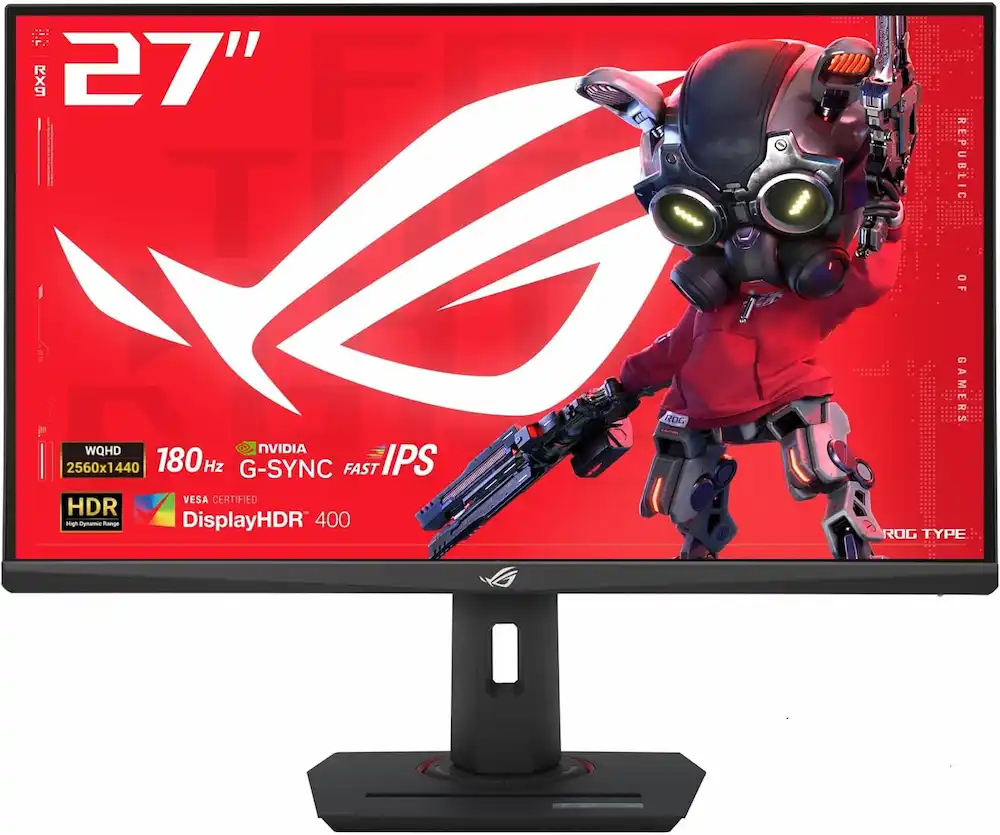
ASUS ROG Strix 27” QHD (2560×1440) HDR400 USB-C Gaming Monitor (XG27ACS), 180Hz, 1ms (Quick Review)
In the hyper-competitive world of 1440p gaming, finding the “sweet spot” usually means compromising on either price or premium features. However, the ASUS ROG Strix 27” QHD (2560×1440) HDR400 USB-C Gaming Monitor (XG27ACS) arrives as a disruptive force, offering professional-grade motion handling and elite color accuracy at a mid-range price point. Whether you are a competitive esports player or a cinematic adventurer, this 180Hz powerhouse aims to be the only screen you’ll ever need.
5 Best 1440p Gaming Monitors for 2025: Comparison & Reviews
To help you decide if the ASUS XG27ACS is right for your desk, we have compared it against the top performers in the current market.
1. ASUS ROG Strix XG27ACS — Top Pick: Best Overall
The ASUS ROG Strix 27” QHD (2560×1440) HDR400 USB-C Gaming Monitor (XG27ACS) earns our top spot because it refuses to act like a “budget” monitor. While most displays in this price bracket require manual calibration, the XG27ACS comes with world-class factory tuning. Its 180Hz Fast IPS panel provides motion clarity that rivals much more expensive 240Hz displays, thanks to its 20-level Variable Overdrive system.
- Pros:
- Incredible out-of-the-box color accuracy (133% sRGB).
- ELMB Sync allows blur reduction and G-Sync to work simultaneously.
- Innovative stand with a built-in smartphone slot and tripod socket.
- Cons:
- USB-C power delivery is limited to 7.5W (not enough for laptop charging).
- No built-in speakers or USB-A hub.
2. ASUS TUF Gaming VG27AQL3A — Budget Pick
If you want the ASUS reliability but need to shave off a few more dollars, the TUF Gaming variant is the way to go. It offers a similar 1440p resolution but skips some of the ROG-exclusive “Republic of Gamers” refinements like the advanced OSD and the premium stand design.
- Pros:
- Extremely affordable for a high-refresh QHD panel.
- Solid 180Hz refresh rate (overclocked).
- Cons:
- Slightly slower response times than the ROG Strix series.
- Contrast ratio is mediocre for dark-room gaming.
3. Alienware AW2725DF — Best Premium (OLED)
For those who have the budget and want the absolute best image quality, this QD-OLED monitor is the gold standard. It offers infinite contrast and a blistering 360Hz refresh rate.
- Pros:
- Infinite contrast with true blacks.
- 0.03ms response time is the fastest in the industry.
- Cons:
- Significantly more expensive than the ASUS XG27ACS.
- Risk of permanent burn-in with static desktop elements.
4. AOC Q27G3XMN — Best for HDR (Mini-LED)
While the ASUS ROG Strix 27” QHD (2560×1440) HDR400 USB-C Gaming Monitor (XG27ACS) handles HDR400 decently, the AOC uses Mini-LED technology to reach much higher brightness levels.
- Pros:
- Full-array local dimming provides deep blacks.
- High peak brightness for punchy HDR highlights.
- Cons:
- Uses a VA panel, which can suffer from “black smearing” in fast motion.
- Viewing angles are narrower than the Fast IPS panel on the ASUS.
5. LG 27GR83Q-B — Best High-Refresh IPS
The LG UltraGear is the direct rival to the XG27ACS for those who prioritize raw speed, offering a 240Hz refresh rate.
- Pros:
- Silky smooth 240Hz movement.
- Excellent G-Sync compatibility.
- Cons:
- Colors aren’t quite as vibrant as the 133% sRGB on the ASUS ROG Strix.
- Lacks the tripod socket and smartphone holder utility.
Detailed Review: Why the ASUS ROG Strix XG27ACS Wins
The ASUS ROG Strix 27” QHD (2560×1440) HDR400 USB-C Gaming Monitor (XG27ACS) is built on the philosophy that performance shouldn’t be gated behind a $500 price tag.
Visual Brilliance and Color Depth
At the heart of this monitor is a Fast IPS panel that covers a staggering 133% of the sRGB color space. This means colors aren’t just accurate; they are saturated and lifelike. For content creators, the 97% DCI-P3 coverage ensures that video editing and photo work can be done with high confidence without needing to buy a secondary “pro” monitor.
Elite Motion Handling
The 180Hz refresh rate is the “sweet spot” for 2025. It provides a noticeable jump over standard 144Hz screens without requiring the massive GPU power needed for 4K. What truly sets the XG27ACS apart is Variable Overdrive 2.0. Most monitors have 3 or 4 overdrive settings; the XG27ACS has 20 levels, allowing you to perfectly tune out ghosting regardless of your frame rate.
Smart Design Features
ASUS included a tripod socket on the top of the stand. This is a game-changer for streamers who want to mount a high-end webcam or a ring light directly to the monitor. Additionally, the base of the stand features a specialized slot to hold your smartphone, keeping your desk clutter-free while you keep an eye on notifications or discord.
Comprehensive Buyer’s Guide: Choosing the Right 1440p Monitor
When shopping for a gaming monitor like the ASUS ROG Strix 27” QHD (2560×1440) HDR400 USB-C Gaming Monitor (XG27ACS), there are four critical pillars you must evaluate:
1. Resolution vs. Screen Size
A 27-inch screen is the ideal size for 1440p (QHD). This combination results in a pixel density of approximately 109 pixels per inch (PPI). This is high enough to make text look sharp and games look detailed, but low enough that you don’t need a $1,000 graphics card to reach high frame rates.
2. Panel Technology: IPS vs. VA vs. OLED
- Fast IPS: Like the XG27ACS, these offer the best balance of speed, color, and viewing angles.
- VA: Great for contrast, but often suffers from “ghosting” in dark scenes.
- OLED: The king of image quality, but very expensive and prone to burn-in.
3. Refresh Rate and Sync Technology
Ensure your monitor supports both NVIDIA G-Sync and AMD FreeSync. This prevents “screen tearing”—where the image appears to split in half during fast movement. The 180Hz found on the ASUS XG27ACS provides a fluid experience that is perfectly suited for both competitive Shooters (Valorant/CS2) and immersive RPGs.
4. Modern Connectivity
Look for USB-C with DP Alt Mode. This allows you to connect modern laptops with a single cable for video. While the XG27ACS only provides 7.5W of power, many competitors in this price range offer no USB-C port at all, making the ASUS a more future-proof investment.
Verdict: Should You Buy It?
The ASUS ROG Strix 27” QHD (2560×1440) HDR400 USB-C Gaming Monitor (XG27ACS) is the most well-rounded gaming monitor released in recent years. It successfully bridges the gap between budget “value” screens and “pro-sumer” displays. If you want a monitor that offers elite color, professional motion tools, and a rugged 3-year warranty, the XG27ACS is currently unbeatable in the sub-$300 category.
“DISCLOSURE: This post contains affiliate links. If you make a purchase through one of our links, we may earn a commission at no extra cost to you.”