
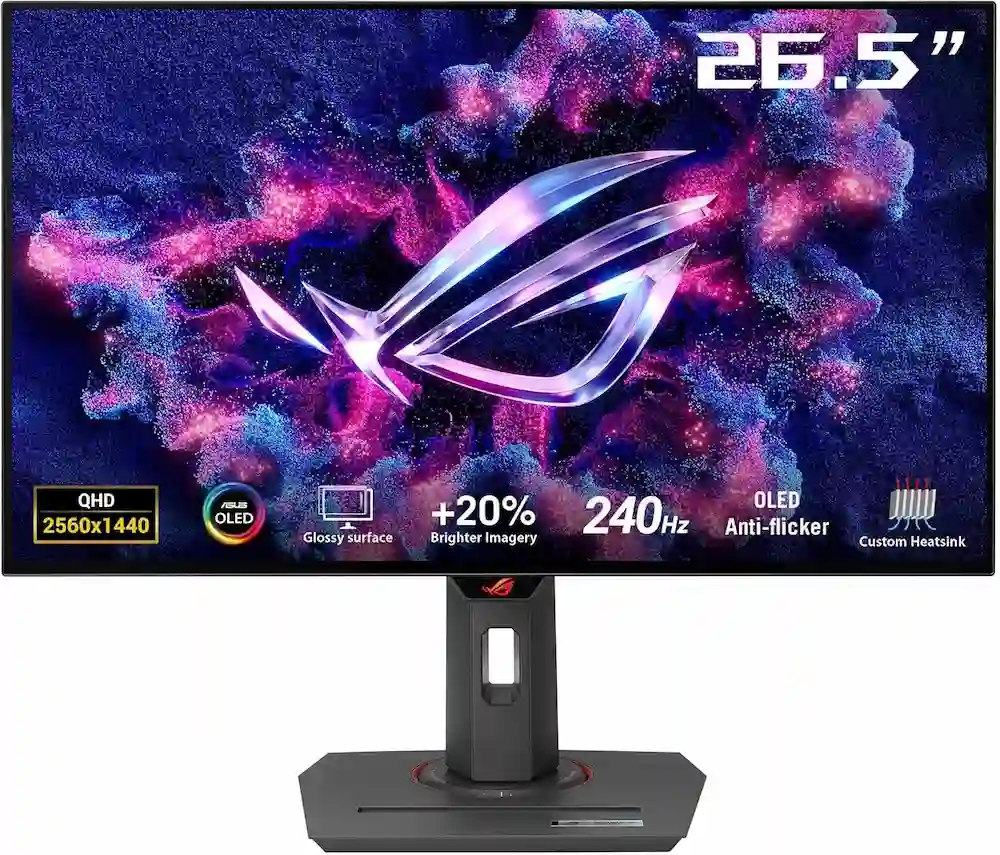
ASUS ROG Strix 27” 1440P OLED Gaming Monitor (XG27AQDMG) – QHD, Glossy OLED, 240Hz, 0.03ms, Custom Heatsink, Anti-flicker, Uniform Brightness, G-SYNC Compatible, 99% DCI-P3, DisplayWidget, 3yr Warranty
The landscape of high-performance gaming has shifted. For years, gamers had to choose between the color accuracy of IPS panels or the speed of TN panels. Today, that compromise is dead. The ASUS ROG Strix 27” 1440P OLED Gaming Monitor (XG27AQDMG) represents the pinnacle of this new era, combining the legendary contrast of OLED technology with a blistering 240Hz refresh rate.
But the market is crowded. With competitors from LG, Samsung, and Alienware all vying for your desk space, does the XG27AQDMG truly stand out? In this comprehensive review, we dive deep into the technical specifications, real-world performance, and the unique “glossy” advantage that sets this monitor apart. Whether you are a competitive esports athlete or an immersive RPG enthusiast, choosing the right 1440p OLED is the single biggest upgrade you can make to your setup in 2025.
1. Top Pick: ASUS ROG Strix 27” 1440P OLED Gaming Monitor (XG27AQDMG)
The ASUS ROG Strix 27” 1440P OLED Gaming Monitor (XG27AQDMG) is a rare breed in the display world. While most WOLED (White OLED) panels utilize a matte anti-glare coating to diffuse reflections, ASUS opted for a glossy finish. This choice is transformative. By removing the matte layer, the XG27AQDMG delivers perceived contrast and “pop” that rivals the more expensive QD-OLED competitors, all while maintaining the deep, “true” blacks that WOLED is known for in bright rooms.
Equipped with a 3rd-generation ROG OLED panel, this monitor reaches a peak brightness that significantly outshines its predecessors. However, the real star of the show is the Uniform Brightness setting. One of the biggest complaints with OLED monitors is the Automatic Brightness Limiter (ABL), which causes the screen to dim when a white window (like a browser) is opened. ASUS has engineered a workaround that keeps luminance levels consistent, making this the first OLED monitor that is genuinely comfortable for 8 hours of office work followed by a night of gaming.
Pros
- Glossy Coating: Provides incredible clarity and vibrant colors without the graininess of matte filters.
- Uniform Brightness Mode: Eliminates distracting ABL shifts during productivity tasks.
- Advanced Cooling: The custom heatsink ensures the panel runs cool, extending the lifespan and reducing burn-in risk.
- OLED Anti-Flicker: Exclusive tech that stabilizes the image during variable refresh rate (VRR) fluctuations.
Cons
- HDMI 2.0 Only: Unlike competitors with HDMI 2.1, you are limited to 144Hz over HDMI (240Hz requires DisplayPort).
- No USB-C Power Delivery: Lacks the “single-cable” solution for laptop users.
2. Best Performance: Alienware AW2725DF 360Hz QD-OLED
If your primary focus is the absolute limit of motion clarity, the Alienware AW2725DF is the monitor to beat. It utilizes a Quantum Dot OLED (QD-OLED) panel that pushes the refresh rate to a staggering 360Hz. In fast-paced shooters like Valorant or Counter-Strike 2, the combination of a 0.03ms response time and 360Hz creates a motion profile that is virtually indistinguishable from reality.
The AW2725DF also benefits from Dell’s legendary warranty service, which includes three years of coverage specifically for OLED burn-in with advanced exchange. However, because it is a QD-OLED without a polarizer, blacks can appear slightly purple or “raised” if you use the monitor in a room with direct sunlight.
Pros
- 360Hz Refresh Rate: The current gold standard for 1440p competitive gaming.
- Superior Color Volume: QD-OLED technology produces more vivid reds and greens compared to standard WOLED.
- Excellent Warranty: 3-year burn-in protection with stellar customer support.
Cons
- Raised Blacks: In bright environments, the screen can lose its “infinite contrast” look.
- Bulky Stand: The hexagonal base takes up significant desk real estate.
3. Best Value: MSI MPG 271QRX QD-OLED
MSI has disrupted the market with the MPG 271QRX. It offers the same 360Hz QD-OLED panel found in the Alienware but adds features that power users crave. This includes a USB-C port with 90W Power Delivery—enough to charge a high-end MacBook Pro or gaming laptop while outputting video—and a built-in KVM switch to control two PCs with one set of peripherals.
For gamers who use their setup for both a gaming rig and a work laptop, the MSI offers the best “bang for your buck” by including these premium productivity features at a price point that often undercuts the competition.
Pros
- 90W USB-C: The most powerful charging port in its class.
- KVM Switch: Easily switch between your work laptop and gaming PC.
- OLED Care 2.0: A massive suite of software tools to prevent burn-in automatically.
Cons
- Firmware Updates: Early units required several updates to stabilize HDR performance.
- Availability: Frequently goes out of stock due to high demand.
4. Best for Glare: Samsung Odyssey OLED G6 (G60SD)
Samsung’s Odyssey G6 takes the 360Hz QD-OLED panel and applies a unique “OLED Glare-Free” matte finish. While the ASUS ROG Strix 27” 1440P OLED Gaming Monitor (XG27AQDMG) celebrates the glossy look, Samsung acknowledges that not everyone games in a cave. If you have a window directly behind you, the G60SD is the best way to enjoy OLED contrast without seeing your own reflection staring back at you.
It also features a sleek, “Core Lighting” design on the back and a very thin metal frame that looks incredibly premium on any desk.
Pros
- Matte Coating: Effectively kills reflections without sacrificing too much color depth.
- Ultra-Thin Design: One of the most aesthetically pleasing monitors on the market.
- VRR Control: A dedicated setting to eliminate the flicker often associated with OLED G-Sync/FreeSync.
Cons
- Complex OSD: Samsung’s menu system can be cumbersome to navigate.
- No USB-C: Similar to the ASUS, it misses out on modern connectivity.
5. Best WOLED Alternative: LG UltraGear 27GS95QE-B
LG is the manufacturer of the WOLED panels used by ASUS, and their own 27GS95QE-B is the “official” version of that tech. It features a new high-brightness algorithm that allows it to reach over 1000 nits in small HDR windows. Unlike the ASUS, it includes HDMI 2.1, making it a better choice for console gamers who want to use a PS5 or Xbox Series X at 120Hz with full HDR features like ALLM and VRR.
Pros
- HDMI 2.1 Support: Full bandwidth for consoles and modern GPUs.
- High HDR Peak: Excels in bright, “flashy” HDR content.
- DTS Headphone:X: Improved spatial audio for those who plug headsets directly into the monitor.
Cons
- Matte Grain: The aggressive anti-glare coating can make white backgrounds look slightly “dirty.”
- Lacks Uniform Brightness: Does not have the productivity-focused brightness stability of the ASUS.
Ultimate Buyer’s Guide: Choosing the Right 1440p OLED
When investing in a monitor like the ASUS ROG Strix 27” 1440P OLED Gaming Monitor (XG27AQDMG), you aren’t just buying a screen; you’re buying a visual experience. Here is what you need to consider before hitting the “buy” button.
WOLED vs. QD-OLED: What’s the Difference?
There are two main types of OLED panels on the market:
- WOLED (LG-made): Known for “inky” blacks even in bright rooms. Historically, they were dimmer, but 3rd-gen panels (like the one in the ASUS XG27AQDMG) have closed the gap.
- QD-OLED (Samsung-made): Uses Quantum Dots to create colors. They offer higher color volume (vibrancy) and generally higher refresh rates (360Hz), but blacks can look greyish in rooms with lots of light.
The Glossy vs. Matte Debate
Glossy monitors provide the sharpest image and the most depth, but they act like a mirror in bright rooms. Matte monitors diffuse light, making them easier to use in offices, but they can introduce a “fuzziness” to the image. The ASUS XG27AQDMG is revolutionary because it brings a glossy finish to the WOLED space, offering the best of both worlds: deep blacks and crystal clarity.
Why 240Hz vs. 360Hz?
For 90% of gamers, 240Hz is the “sweet spot.” It is easier for your PC to hit 240 FPS at 1440p resolution than 360 FPS. However, if you are a professional esports player, the 360Hz refresh rate on the Alienware or MSI models provides a slight edge in input lag and motion persistence.
Burn-In Protection: Should You Worry?
Modern OLEDs come with extensive protection features.
- Pixel Cleaning: Refreshes the pixels during standby.
- Custom Heatsinks: Found in the ASUS ROG models, these draw heat away from the panel, which is the #1 cause of pixel degradation.
- Logo Dimming: Detects static elements (like taskbars) and dims them to prevent permanent marks.Always look for a 3-year warranty that explicitly covers burn-in.
Final Verdict: Why the ASUS ROG XG27AQDMG Wins
While the 360Hz competitors offer more speed on paper, the ASUS ROG Strix 27” 1440P OLED Gaming Monitor (XG27AQDMG) is the most balanced monitor for the modern user. Its glossy WOLED panel provides a level of image “pop” that was previously unavailable in this category. More importantly, its Uniform Brightness feature solves the single biggest headache of using an OLED for daily work.
If you want a monitor that makes Cyberpunk 2077 look like a movie, gives you a competitive edge in Call of Duty, and doesn’t annoy you when you’re writing an email, the ASUS XG27AQDMG is the undisputed king of 1440p displays.
“DISCLOSURE: This post contains affiliate links. If you make a purchase through one of our links, we may earn a commission at no extra cost to you.”