
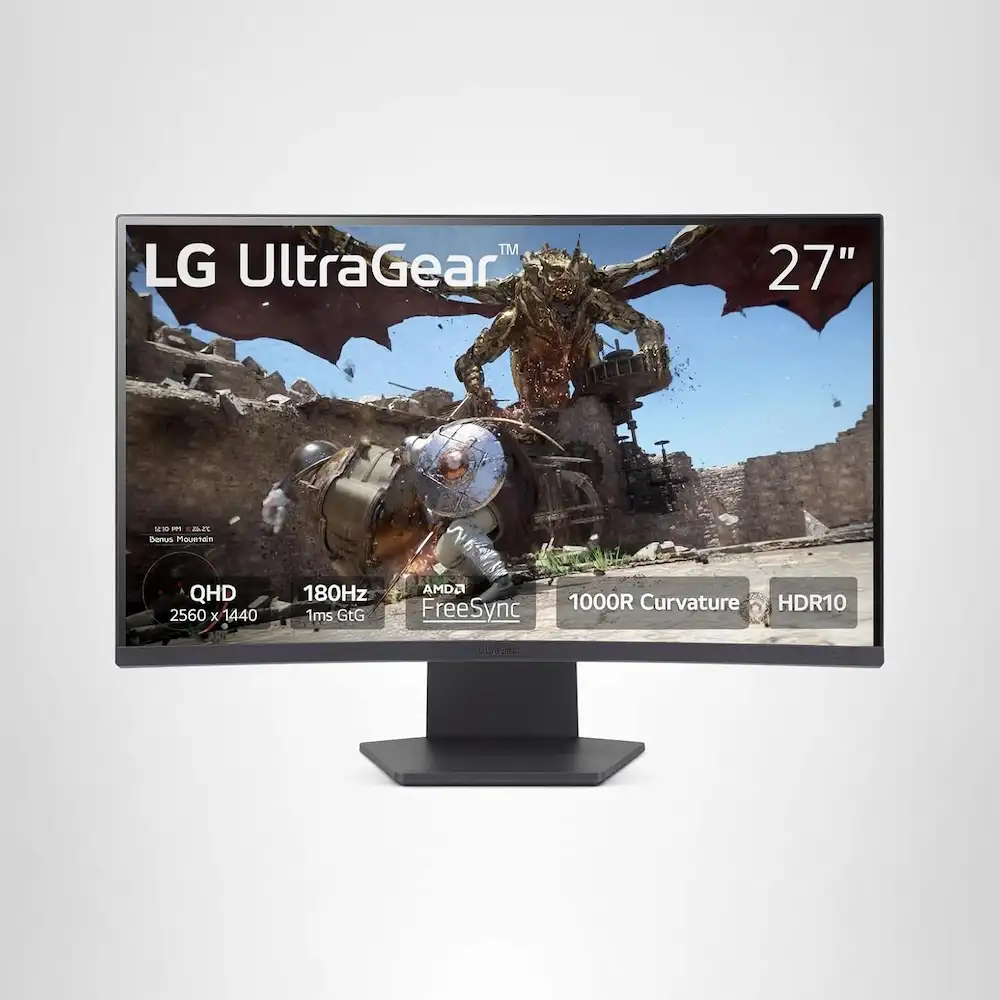
LG 27GS60QC-B Ultragear Curved Gaming Monitor: The 5 Best 1440p Gaming Monitors (2025 Review)
Choosing the right display is the single most important upgrade you can make for your gaming rig. While a powerful GPU renders the frames, it is the monitor that breathes life into them. Currently, the LG 27GS60QC-B Ultragear Curved Gaming Monitor is making waves as a price-to-performance champion, but how does it stack up against the best in the market?
In this comprehensive guide, we review the LG 27GS60QC-B Ultragear Curved Gaming Monitor alongside four other top-tier contenders to help you find the perfect match for your setup. Whether you are a competitive esports player or a cinematic RPG enthusiast, we have found the best 1440p curved displays for 2025.
1. Top Pick: LG 27GS60QC-B Ultragear Curved Gaming Monitor
The LG 27GS60QC-B Ultragear Curved Gaming Monitor is our definitive top pick for 2025 because it hits the “sweet spot” of gaming specifications. Featuring a 27-inch QHD (2560×1440) resolution and a lightning-fast 180Hz refresh rate, it delivers the crispness of 1440p with the fluidity required for professional-grade gaming.
What sets this model apart is the 1000R curvature. Unlike subtler 1500R curves, the 1000R arc closely matches the natural field of human vision. This creates a deeply immersive experience that reduces eye strain during long sessions. With a 1ms (GtG) response time and AMD FreeSync support, screen tearing is a thing of the past.
Pros
- Ultimate Immersion: The 1000R curve provides a wrap-around feel that is perfect for simulation and racing games.
- High Refresh Speed: 180Hz offers a noticeable step up from the standard 144Hz found in budget models.
- Vibrant Colors: 99% sRGB color gamut ensures your games look as the developers intended.
- Gaming Features: Includes Black Stabilizer, Crosshair, and an FPS counter.
Cons
- Tilt Only Stand: The included stand lacks height and swivel adjustments.
- VA Viewing Angles: While good, it doesn’t match the wide viewing angles of more expensive IPS panels.
2. Best Premium OLED: ASUS ROG Swift PG27AQDP
If budget is no object and you want the absolute pinnacle of display technology, the ASUS ROG Swift PG27AQDP is the gold standard. While the LG 27GS60QC-B Ultragear Curved Gaming Monitor focuses on value, this ASUS monster utilizes an OLED panel with a staggering 480Hz refresh rate.
The infinite contrast ratio of OLED means blacks are truly black, making HDR gaming an otherworldly experience. However, be prepared to pay a significant premium for these features.
Pros
- Infinite Contrast: Unbeatable HDR performance with true blacks.
- 480Hz Refresh Rate: The fastest 1440p monitor currently available for competitive play.
- Instant Response: 0.03ms response time eliminates all motion blur.
Cons
- Extremely Expensive: Costs nearly four times as much as the LG Ultragear.
- Burn-in Risk: Standard OLED concern, though mitigated by ASUS cooling tech.
3. Best Budget Pick: Gigabyte GS32QC
For those who want more screen real estate without breaking the bank, the Gigabyte GS32QC is a fantastic alternative. It offers a larger 32-inch canvas but maintains the 1440p resolution. While it is slightly slower at 165Hz compared to the 180Hz on the LG 27GS60QC-B Ultragear Curved Gaming Monitor, it provides excellent value for casual gamers.
Pros
- Massive Screen: 32 inches offers a more cinematic feel for RPGs.
- Great Value: Often found on sale for under $250.
- High Contrast: VA panel delivers deep blacks for night-time gaming.
Cons
- Lower Pixel Density: 1440p on 32 inches is less sharp than on 27 inches.
- Slower Refresh: Maxes out at 165Hz.
4. Best for Ergonomics: Dell S3222DGM
Dell has a reputation for world-class build quality, and the S3222DGM is no exception. While the LG 27GS60QC-B Ultragear Curved Gaming Monitor focuses on speed and curvature, Dell focuses on the user experience. This monitor features a fully adjustable stand that allows you to find the perfect ergonomic position.
Pros
- Superior Build: Heavy-duty stand with height and tilt adjustment.
- Accurate Colors: Excellent calibration straight out of the box.
- Subtle Curve: 1800R curve is better for those who also use their monitor for office work.
Cons
- Older Tech: Does not feature the newer 180Hz panels.
- Bulky Design: Takes up more desk space than the borderless LG design.
5. Best Hybrid: MSI MAG 271QP QD-OLED
The MSI MAG 271QP is a “Quantum Dot” OLED hybrid. It offers colors that are even more saturated than the LG 27GS60QC-B Ultragear Curved Gaming Monitor. It’s a great choice if you split your time between high-end gaming and professional video editing.
Pros
- Quantum Dot Layer: Produces the most vibrant reds and greens in the industry.
- Fast IPS Performance: Excellent motion clarity with wide viewing angles.
- Modern Connectivity: Includes USB-C power delivery for laptops.
Cons
- Pricey: Sits in the mid-to-high price bracket.
- Oversaturated: Some users may find the colors too “neon” without calibration.
Buyer’s Guide: How to Choose the Right 1440p Monitor
When searching for a new display, it is easy to get lost in the jargon. Here is what you need to prioritize to ensure you get the best experience.
Resolution vs. Screen Size
The standard for modern gaming is QHD (2560×1440). At 27 inches, this resolution provides a high pixel density (PPI), making text sharp and images detailed. If you move up to 32 inches, the pixels are spread thinner, which can lead to a slightly “softer” image. The LG 27GS60QC-B Ultragear Curved Gaming Monitor at 27 inches is widely considered the “sweet spot” for clarity.
Refresh Rate and Response Time
For competitive gaming, the refresh rate (measured in Hz) is king. A 180Hz monitor like the LG Ultragear updates the image 180 times per second, providing a significant advantage in shooters like Counter-Strike 2 or Valorant. Pair this with a low GtG (Gray-to-Gray) response time to minimize ghosting.
Understanding Curvature (1000R vs 1500R)
The “R” value indicates the radius of the curve in millimeters.
- 1000R: An aggressive curve that matches the human eye. Best for immersion.
- 1500R/1800R: A gentler curve. Better for setups where you might also do graphic design or office work.
Panel Types: VA vs. IPS vs. OLED
| Panel Type | Best For | Pros | Cons |
| VA | Contrast & Value | Deep blacks, affordable | Slower response times |
| IPS | Color Accuracy | Great viewing angles | “IPS Glow” in dark rooms |
| OLED | Everything (Luxury) | Infinite contrast, 0ms response | Expensive, burn-in risk |
Final Verdict
If you are looking for the best all-around performer that won’t empty your bank account, the LG 27GS60QC-B Ultragear Curved Gaming Monitor is the clear winner. Its combination of 180Hz speed, 1440p resolution, and the immersive 1000R curve makes it a formidable centerpiece for any gaming station. While OLEDs offer better blacks, the value proposition of this LG Ultragear model is simply unbeatable in 2025.
“DISCLOSURE: This post contains affiliate links. If you make a purchase through one of our links, we may earn a commission at no extra cost to you.”