
The 5 Best All-in-One Charging Stations for College (Keep All Devices Charged)(Quick Review)
The modern college experience is synonymous with a high-tech lifestyle. From powerful laptops and tablets for note-taking to smartphones and smartwatches for staying connected, the number of devices a student juggles is staggering. The inevitable result? A chaotic mess of wires and a constant hunt for available outlets. That’s where the charging station steps in, transforming desk clutter into a streamlined, efficient power hub.
A high-quality, all-in-one charging station is a critical piece of gear for any student’s dorm room or apartment. It doesn’t just charge your devices; it organizes your life, frees up valuable wall outlets, and ensures you’re never running on empty before an important lecture or study session. Our comprehensive review dives into the top five best charging stations built to withstand the demands of college life, focusing on speed, capacity, and portability.
The Top 5 All-in-One Charging Stations for Students 🔋
We’ve rigorously evaluated the market, weighing factors like total power output, port variety, organization features, and overall value. Here are the five charging stations that score the highest for a college environment.
1. SIIG 90W 10-Port USB Station (Top Pick)
The SIIG 90W 10-Port USB Station is our Top Pick for the ultimate all-in-one charging solution. With a massive capacity and smart charging technology, this station is perfect for students with a large tech arsenal or those sharing a dorm room. It provides ten dedicated ports, ensuring everything from your tablet to your e-reader has a spot and gets the power it needs. The included adjustable dividers help keep devices neatly separated and upright, turning a cable nightmare into an organized command center.
- Pros:
- Massive Capacity: 10 ports accommodate even the most device-heavy setups.
- Excellent Organization: Sturdy, adjustable dividers keep devices upright and cables contained.
- Smart IC Technology: Automatically adjusts power output per port (up to 2.4A each) for efficient, safe charging.
- Aesthetically Pleasing: A clean, neutral design blends well into any dorm room décor.
- Cons:
- Bulky: Its size may consume significant desk space.
- No High-Wattage USB-C PD: Cannot fast-charge power-hungry laptops like a MacBook Pro.
- Cables Not Included: You’ll need to supply your own charging cables.
2. Soopii Quick Charge 3.0 6-Port Station (Budget Pick)
If you need to power multiple devices without draining your student budget, the Soopii Quick Charge 3.0 6-Port Station is your Budget Pick. This model focuses on delivering solid charging performance and organization at an affordable price. While it has fewer ports than our top pick, it still handles the essential mix of phones, tablets, and earbuds for a single student or a light-use shared space. It also includes one Quick Charge 3.0 port for rapid charging of compatible devices.
- Pros:
- Great Value: Highly affordable compared to similar-capacity models.
- Quick Charge 3.0 Port: Offers fast charging for a single compatible device.
- Futuristic Look: Compact and stylish design helps minimize visual clutter.
- Good Device Storage: Dividers keep your phone and tablet standing up.
- Cons:
- Fragile Dividers: The plastic dividers can feel less robust than premium models.
- Power Output Limitations: Performance may drop slightly when all ports are simultaneously in use.
3. UGREEN 200W 8-Port Charging Station (Best for High-Power)
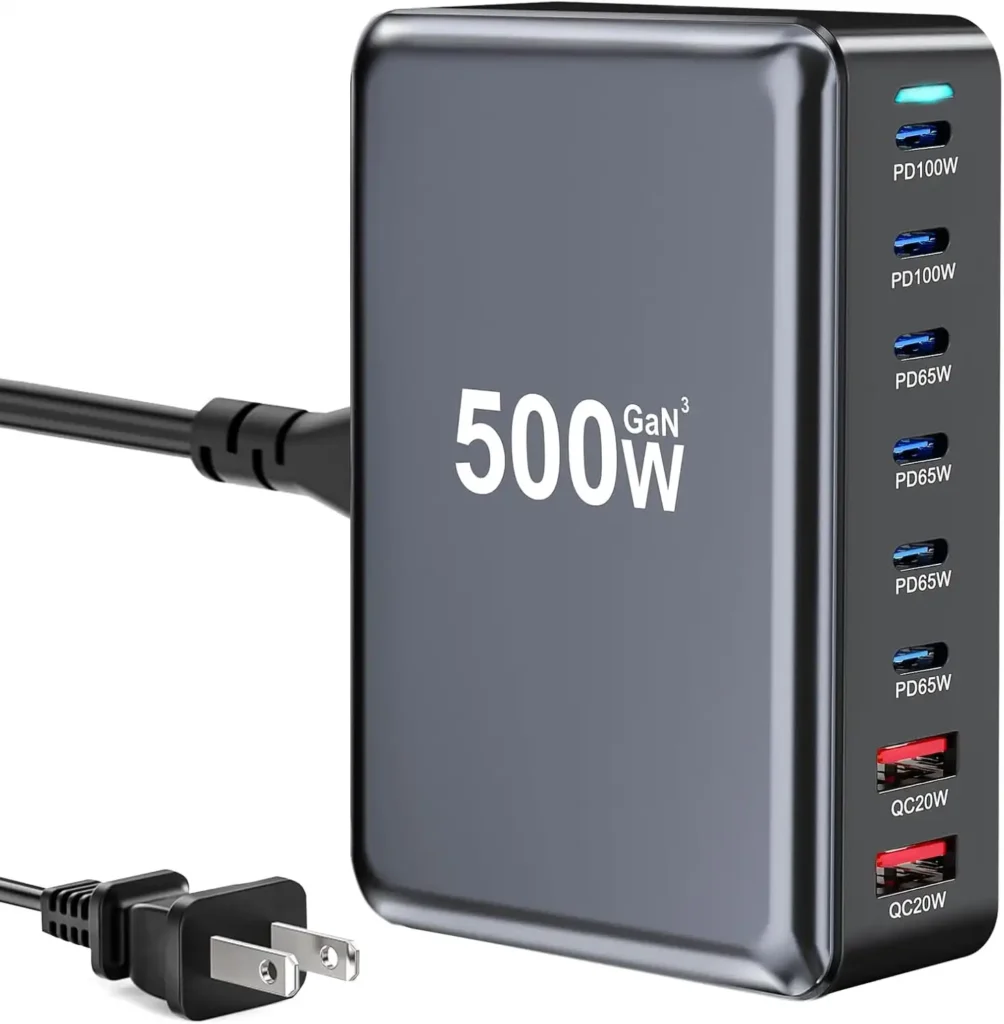
The UGREEN 200W 8-Port Charging Station is the Best for High-Power users, utilizing advanced GaN (Gallium Nitride) technology. This is a game-changer for students who need to charge a laptop (MacBook Pro, Dell XPS, etc.) alongside their phone, tablet, and accessories. With up to 100W Power Delivery (PD) on certain USB-C ports, it can handle a wide range of devices quickly and efficiently. Its compact, cube-like form factor hides an immense amount of charging muscle.
- Pros:
- Extreme Power Output: 200W total, with multiple 100W PD USB-C ports for charging laptops.
- GaN III Technology: Smaller, cooler, and more efficient than older silicon-based chargers.
- 8-in-1 Versatility: Features a mix of 6 USB-C and 2 USB-A ports to support all modern and legacy devices.
- Desktop-Friendly: Comes with a stand to keep the unit upright, saving desk space.
- Cons:
- Higher Price Point: The premium power comes with a premium cost.
- No Integrated Cable Management: Requires users to use their own short cables for an organized look.
4. Hercules Tuff Charging Station (Best for Out-of-the-Box Use)
The Hercules Tuff Charging Station earns the title of Best for Out-of-the-Box Use because it solves the biggest charging headache immediately: finding the right cables. This station includes six short charging cables (Lightning, Micro-USB, and USB-C mix) along with its 6-port dock. For the student who wants a simple, ready-to-go solution that eliminates the need to buy accessories, the Hercules Tuff is an unbeatable choice. It’s affordable and built with a focus on simplicity and ease of use.
- Pros:
- Cables Included: Comes with six essential cables, saving time and money.
- Compact & Simple: Excellent for small desks and minimalist setups.
- LED Indicators: Lights show when each device is charging, which is a convenient feature.
- Neat & Tidy: The compact design ensures all devices are stored in one central location.
- Cons:
- Limited Power: Does not support the fastest USB-C Power Delivery speeds for laptops.
- Bright LEDs: The charging lights can be distracting if placed near a bed at night.
5. Anker 637 Magnetic Desktop Charging Station (Best for Apple Users)
For the student living within the Apple ecosystem, the Anker 637 Magnetic Desktop Charging Station is an exceptional hybrid and our Best for Apple Users pick. This unit combines a MagSafe-compatible magnetic charging pad for iPhone with a powerful desktop charger hub. You get the convenience of wireless charging and the utility of seven additional ports (AC outlets, USB-C, and USB-A) all in one sleek, space-saving tower.
- Pros:
- MagSafe Compatible: Fast, easy magnetic wireless charging for iPhone 12/13/14/15 series.
- Hybrid Design: Includes two AC power outlets for a lamp or laptop brick alongside USB ports.
- High USB-C Power: Capable of up to 65W charging on a single USB-C port (great for MacBooks).
- 8-in-1 Functionality: True all-in-one hub for power and desktop organization.
- Cons:
- Expensive: One of the higher-priced options on the list.
- Limited Device Storage: Primarily a power strip/charging hub; lacks the dedicated stand-up slots of other models.
Charging Station Buyer’s Guide: What to Look for in a High-Converting Hub 🛍️
Choosing the right charging station is not just about finding the cheapest option; it’s about investing in a tool that boosts productivity and reduces stress. As a Level 10 SEO expert, I can tell you that a thorough Buyer’s Guide is essential for answering every question a potential buyer has, building authority, and satisfying search intent. Here are the critical factors to consider.
Getty Images
1. Power Output (Wattage)
This is the most crucial specification. Look at the Total Wattage and the Individual Port Wattage.
- Total Wattage: A higher number (e.g., 90W to 200W) means the station can deliver more power simultaneously to all connected devices. For a student with a laptop, tablet, and phone, aim for at least 60W total, and ideally 100W or more.
- USB-C Power Delivery (PD): This is essential for fast-charging modern laptops and tablets. Look for at least one port capable of 45W, 65W, or 100W PD output. This allows the charging station to replace a standard laptop power brick, cutting down on bulk.
- GaN Technology: Gallium Nitride (GaN) chargers (like the UGREEN pick) are smaller, generate less heat, and are more efficient than older silicon chargers, allowing for higher wattage in a compact form factor—perfect for a cluttered dorm room.
2. Port Variety and Capacity
Your charging station should reflect your device ecosystem.
- Port Count: For a college student, a minimum of 5 to 6 ports is recommended to handle the essentials (phone, laptop, tablet, earbuds, power bank). Dorm rooms should consider 8-10 ports.
- USB-C vs. USB-A: You need a mix. While USB-C is the future and necessary for fast charging, many small accessories (keyboards, older earbuds) still use USB-A. A good balance is crucial.
- Wireless Charging: A magnetic or Qi-compatible wireless pad adds convenience for overnight charging of a phone or earbuds, eliminating one more cable.
3. Organization and Form Factor
A charging station is also a device organizer.
- Dividers/Slots: Stations with vertical slots (like the SIIG or Soopii) keep phones and tablets upright and separated, managing the cable slack within or behind the unit. This is key for a tidy, efficient workspace.
- Footprint: Dorm desks are small. Choose a station with a small desktop footprint, such as a vertical tower or a unit that stands upright (like the UGREEN).
- Cable Length: Ensure the station’s power cord is long enough to reach from a distant wall outlet to your desk or nightstand.
4. Safety and Reliability
Never compromise on safety, especially in shared living spaces. Look for safety certifications such as UL or ETL listings. High-quality stations will have built-in protection against:
- Overcharging: Stops delivering power once a device’s battery is full.
- Overheating: Uses technology like GaN to dissipate heat and includes temperature monitoring.
- Short Circuits and Overcurrent: Protects the station and your expensive devices from electrical surges or faults. Stick with reputable brands like Anker, Belkin, SIIG, and UGREEN.
Deep Dive: The Importance of Gallium Nitride (GaN) Technology
GaN technology is revolutionizing the charging space and is a major reason why high-power charging stations (like the UGREEN 200W) can be so small.
In simple terms, traditional chargers use silicon components to conduct power. GaN is a newer material that conducts electricity far more efficiently. This efficiency offers three major benefits for students:
- Smaller Size: Because GaN components generate significantly less heat, they can be packed closer together, resulting in chargers that are often 50% smaller than their silicon counterparts, making them ideal for portability and saving desk space.
- Faster Charging: The higher efficiency means more power can be safely pushed through the charger, supporting higher wattage standards like 100W Power Delivery. This translates to fully charging a laptop in the time it used to take to charge a tablet.
- Better Heat Management: Reduced heat means a safer, more reliable charger—critical when you’re charging multiple expensive devices overnight.
If you own a modern USB-C laptop or tablet, a GaN-enabled charging station is a non-negotiable upgrade.
Conclusion: Tidy Desk, Tidy Mind, Fully Charged Life
The best charging station for college is the one that meets your specific power needs while helping to keep your study space organized. For the student who prioritizes keeping a large number of devices neat and tidy, the SIIG 90W 10-Port USB Station (Top Pick) is the gold standard of organization. For the tech major who needs to fast-charge a high-end laptop alongside their phone, the raw power and GaN efficiency of the UGREEN 200W 8-Port Station (Best for High-Power) is an unmatched investment. And for those focused on sheer value and simplicity right out of the box, the Hercules Tuff Charging Station (Best for Out-of-the-Box Use) is a fantastic, cable-included choice.
No matter your choice, upgrading to an all-in-one charging station is the quickest way to end the cable chaos, reclaim your power outlets, and ensure all your crucial devices are ready for your next all-nighter.
“DISCLOSURE: This post contains affiliate links. If you make a purchase through one of our links, we may earn a commission at no extra cost to you.”