
The Best Acer Aspire 14 AI Copilot+ PC and Top AI Laptops of 2025 (Full Review)
In the rapidly evolving world of personal computing, the “AI PC” is no longer a futuristic concept—it is a current reality. Leading the charge is the Acer Aspire 14 AI Copilot+ PC, a machine designed to leverage the power of the Intel Core Ultra 7 Processor 256V and a dedicated NPU capable of 47 TOPS. Whether you are a creative professional, a student, or a remote worker, finding a laptop that balances processing power with intelligent automation is essential for staying competitive.
In this comprehensive review, we evaluate the Acer Aspire 14 AI alongside four other market leaders to help you decide which AI-driven machine deserves a spot on your desk.
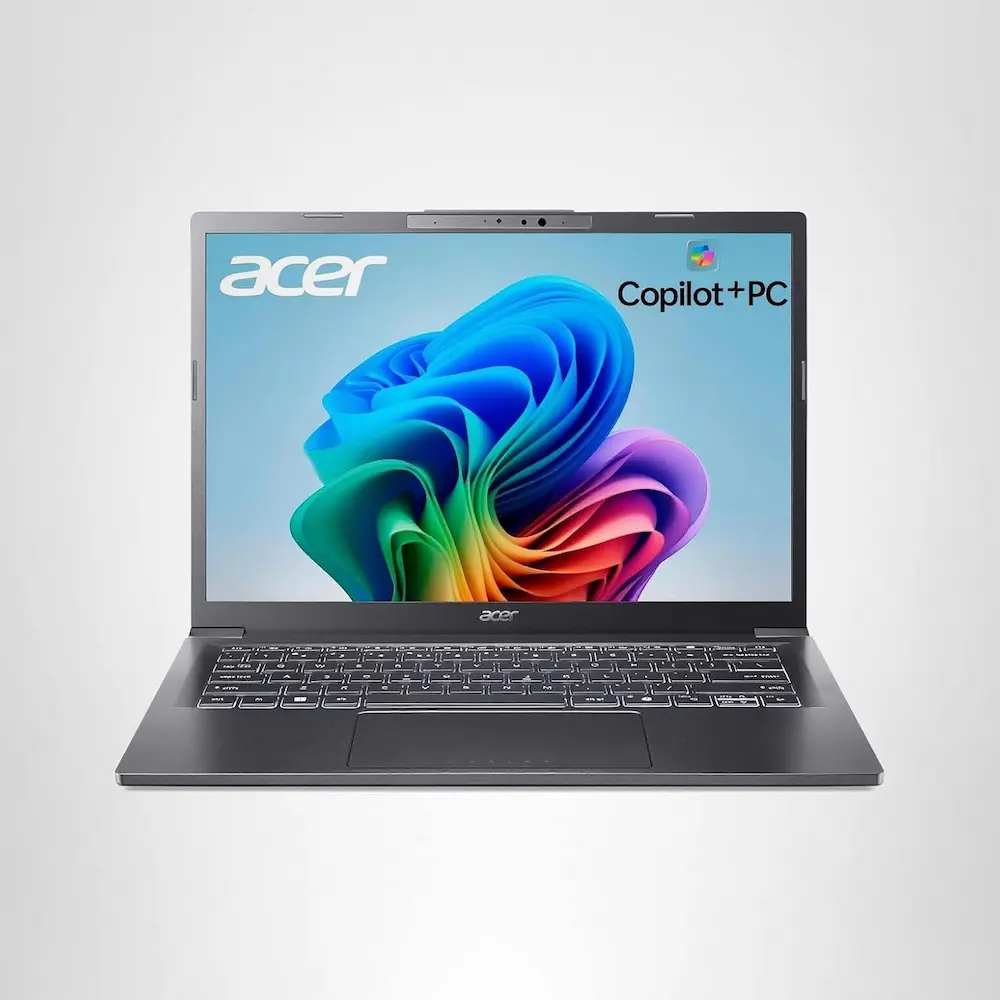
1. Top Pick: Acer Aspire 14 AI Copilot+ PC (A14-52M-72S0)
The Acer Aspire 14 AI Copilot+ PC is the gold standard for users who want to dive deep into the Windows 11 AI ecosystem without spending several thousand dollars. Driven by the Intel Core Ultra 7 Processor 256V, this machine features an integrated Intel ARC 140V GPU and a high-performance NPU.
With 47 TOPS (Trillions of Operations Per Second) dedicated specifically to AI tasks, this laptop handles Windows Studio Effects, Live Captions, and Cocreator with ease. The 14-inch WUXGA display provides crisp visuals, while the 1TB SSD ensures you never run out of space for your heavy datasets or creative projects.
Pros
- Exceptional AI Performance: The 47 TOPS NPU is a game-changer for local AI processing.
- Efficient Multitasking: 16GB LPDDR5X RAM ensures smooth transitions between heavy applications.
- Future-Proof Connectivity: Includes Wi-Fi 6E for ultra-fast, low-latency internet.
- Sleek Portability: The 14-inch form factor is perfect for professionals on the move.
Cons
- Display Brightness: While clear, the WUXGA screen may struggle in direct outdoor sunlight.
- Integrated Graphics: While the ARC 140V is powerful, it isn’t a replacement for a dedicated NVIDIA RTX card for heavy 4K video editing.
2. Best for Creative Professionals: ASUS Vivobook S 15 OLED
If the display is your primary concern, the ASUS Vivobook S 15 is a formidable rival to the Acer Aspire 14 AI Copilot+ PC. It features a stunning 3K OLED panel that makes color grading and photo editing a dream.
Pros
- Stunning OLED Display: 120Hz refresh rate and 100% DCI-P3 color gamut.
- Dedicated AI Key: Faster access to Copilot tools.
- Long Battery Life: Optimized for long sessions away from the plug.
Cons
- Price Point: Generally more expensive than the Acer Aspire 14 AI.
- Glossy Screen: High reflections in bright environments.
3. Budget Pick: HP Pavilion Plus 14 AI
For those who want to experience the “AI PC” revolution on a tighter budget, the HP Pavilion Plus 14 offers a solid entry point. It utilizes a slightly lower-tier Intel Ultra 5 processor but still retains essential NPU capabilities.
Pros
- Affordability: The best price-to-performance ratio for entry-level AI tasks.
- Solid Build: Robust aluminum chassis.
- Great Keyboard: Highly tactile typing experience for writers.
Cons
- Lower NPU Throughput: Not as fast as the Acer Aspire 14 AI’s 47 TOPS.
- Slower RAM: Often ships with standard LPDDR5 rather than the “X” variant.
4. Best for Battery Life: MacBook Air (M3 Chip)
While not a “Copilot+” PC in the Windows sense, the M3 MacBook Air is Apple’s answer to AI. Its Neural Engine is highly efficient, and the battery life remains the industry benchmark.
Pros
- Incredible Longevity: Easily lasts 15-18 hours on a single charge.
- Silent Operation: Fanless design means zero noise.
- Ecosystem Integration: Works perfectly with iPhones and iPads.
Cons
- Limited Ports: Only two USB-C ports.
- Not Copilot Native: Does not support Windows-specific AI features like Recall natively.
5. Best 2-in-1 Alternative: Lenovo Yoga 7i 2-in-1
If you need the flexibility of a tablet but the brains of an AI PC, the Yoga 7i is the way to go. It offers a touchscreen and stylus support, making it a great companion for the Acer Aspire 14 AI Copilot+ PC users who prefer hand-drawing.
Pros
- Versatile Design: Use it as a tablet, tent, or laptop.
- Excellent Audio: Front-facing speakers provide an immersive experience.
- Included Stylus: Great for Windows Ink and AI sketching.
Cons
- Weight: Slightly heavier than the Acer Aspire 14 due to the 360-degree hinge.
- Thermal Throttling: Can get warm under heavy AI workloads.
Buyer’s Guide: How to Choose the Right AI PC
Choosing a laptop in 2025 requires looking beyond just “RAM and Storage.” With the introduction of the Acer Aspire 14 AI Copilot+ PC, a new metric has emerged: TOPS.
Understanding TOPS (Trillions of Operations Per Second)
The “TOPS” rating refers to the power of the NPU (Neural Processing Unit). To be a certified “Copilot+ PC,” a laptop generally needs an NPU capable of at least 40 TOPS. The Acer Aspire 14 AI exceeds this with 47 TOPS, allowing it to:
- Blur backgrounds in video calls without taxing the CPU.
- Generate images in real-time using Cocreator.
- Translate live audio into subtitles instantly.
Processor: Intel Core Ultra Series 2 vs. The Rest
The Intel Core Ultra 7 Processor 256V found in the Acer Aspire 14 AI represents a massive leap in efficiency. Unlike previous generations, these chips are designed to sip power during idle tasks while providing “burst” power for AI-driven workflows.
Connectivity and Future-Proofing
Look for Wi-Fi 6E or Wi-Fi 7. Since many AI tools rely on the cloud, a fast and stable internet connection is non-negotiable. Furthermore, ensure the laptop has at least 16GB of LPDDR5X RAM. AI models are memory-intensive; anything less will lead to system bottlenecks.
Maximizing the Acer Aspire 14 AI Copilot+ PC Experience
To get the most out of your Acer Aspire 14 AI Copilot+ PC, you should familiarize yourself with the built-in Acer Sense software. This dashboard allows you to toggle between “AI Boost” modes, optimizing your NPU for either maximum performance or maximum battery savings.
Furthermore, the Intel ARC 140V GPU inside this machine is surprisingly capable. While not a “gaming laptop” per se, it can handle modern titles at 1080p settings, making it a versatile machine for work and play.
Who is this laptop for?
- Remote Workers: The AI-enhanced noise cancellation and webcam effects are world-class.
- Data Analysts: The 1TBThe Best Acer Aspire 14 AI Copilot+ PC and Top AI Laptops of 2025 (Full Review)
In the rapidly evolving world of personal computing, the “AI PC” is no longer a futuristic concept—it is a current reality. Leading the charge is the Acer Aspire 14 AI Copilot+ PC, a machine designed to leverage the power of the Intel Core Ultra 7 Processor 256V and a dedicated NPU capable of 47 TOPS. Whether you are a creative professional, a student, or a remote worker, finding a laptop that balances processing power with intelligent automation is essential for staying competitive.
In this comprehensive review, we evaluate the Acer Aspire 14 AI alongside four other market leaders to help you decide which AI-driven machine deserves a spot on your desk.
1. Top Pick: Acer Aspire 14 AI Copilot+ PC (A14-52M-72S0)
The Acer Aspire 14 AI Copilot+ PC is the gold standard for users who want to dive deep into the Windows 11 AI ecosystem without spending several thousand dollars. Driven by the Intel Core Ultra 7 Processor 256V, this machine features an integrated Intel ARC 140V GPU and a high-performance NPU.
With 47 TOPS (Trillions of Operations Per Second) dedicated specifically to AI tasks, this laptop handles Windows Studio Effects, Live Captions, and Cocreator with ease. The 14-inch WUXGA display provides crisp visuals, while the 1TB SSD ensures you never run out of space for your heavy datasets or creative projects.
Pros
Exceptional AI Performance: The 47 TOPS NPU is a game-changer for local AI processing.
Efficient Multitasking: 16GB LPDDR5X RAM ensures smooth transitions between heavy applications.
Future-Proof Connectivity: Includes Wi-Fi 6E for ultra-fast, low-latency internet.
Sleek Portability: The 14-inch form factor is perfect for professionals on the move.
Cons
Display Brightness: While clear, the WUXGA screen may struggle in direct outdoor sunlight.
Integrated Graphics: While the ARC 140V is powerful, it isn’t a replacement for a dedicated NVIDIA RTX card for heavy 4K video editing.
2. Best for Creative Professionals: ASUS Vivobook S 15 OLED
If the display is your primary concern, the ASUS Vivobook S 15 is a formidable rival to the Acer Aspire 14 AI Copilot+ PC. It features a stunning 3K OLED panel that makes color grading and photo editing a dream.
Pros
Stunning OLED Display: 120Hz refresh rate and 100% DCI-P3 color gamut.
Dedicated AI Key: Faster access to Copilot tools.
Long Battery Life: Optimized for long sessions away from the plug.
Cons
Price Point: Generally more expensive than the Acer Aspire 14 AI.
Glossy Screen: High reflections in bright environments.
3. Budget Pick: HP Pavilion Plus 14 AI
For those who want to experience the “AI PC” revolution on a tighter budget, the HP Pavilion Plus 14 offers a solid entry point. It utilizes a slightly lower-tier Intel Ultra 5 processor but still retains essential NPU capabilities.
Pros
Affordability: The best price-to-performance ratio for entry-level AI tasks.
Solid Build: Robust aluminum chassis.
Great Keyboard: Highly tactile typing experience for writers.
Cons
Lower NPU Throughput: Not as fast as the Acer Aspire 14 AI’s 47 TOPS.
Slower RAM: Often ships with standard LPDDR5 rather than the “X” variant.
4. Best for Battery Life: MacBook Air (M3 Chip)
While not a “Copilot+” PC in the Windows sense, the M3 MacBook Air is Apple’s answer to AI. Its Neural Engine is highly efficient, and the battery life remains the industry benchmark.
Pros
Incredible Longevity: Easily lasts 15-18 hours on a single charge.
Silent Operation: Fanless design means zero noise.
Ecosystem Integration: Works perfectly with iPhones and iPads.
Cons
Limited Ports: Only two USB-C ports.
Not Copilot Native: Does not support Windows-specific AI features like Recall natively.
5. Best 2-in-1 Alternative: Lenovo Yoga 7i 2-in-1
If you need the flexibility of a tablet but the brains of an AI PC, the Yoga 7i is the way to go. It offers a touchscreen and stylus support, making it a great companion for the Acer Aspire 14 AI Copilot+ PC users who prefer hand-drawing.
Pros
Versatile Design: Use it as a tablet, tent, or laptop.
Excellent Audio: Front-facing speakers provide an immersive experience.
Included Stylus: Great for Windows Ink and AI sketching.
Cons
Weight: Slightly heavier than the Acer Aspire 14 due to the 360-degree hinge.
Thermal Throttling: Can get warm under heavy AI workloads.
Buyer’s Guide: How to Choose the Right AI PC
Choosing a laptop in 2025 requires looking beyond just “RAM and Storage.” With the introduction of the Acer Aspire 14 AI Copilot+ PC, a new metric has emerged: TOPS.
Understanding TOPS (Trillions of Operations Per Second)
The “TOPS” rating refers to the power of the NPU (Neural Processing Unit). To be a certified “Copilot+ PC,” a laptop generally needs an NPU capable of at least 40 TOPS. The Acer Aspire 14 AI exceeds this with 47 TOPS, allowing it to:
Blur backgrounds in video calls without taxing the CPU.
Generate images in real-time using Cocreator.
Translate live audio into subtitles instantly.
Processor: Intel Core Ultra Series 2 vs. The Rest
The Intel Core Ultra 7 Processor 256V found in the Acer Aspire 14 AI represents a massive leap in efficiency. Unlike previous generations, these chips are designed to sip power during idle tasks while providing “burst” power for AI-driven workflows.
Connectivity and Future-Proofing
Look for Wi-Fi 6E or Wi-Fi 7. Since many AI tools rely on the cloud, a fast and stable internet connection is non-negotiable. Furthermore, ensure the laptop has at least 16GB of LPDDR5X RAM. AI models are memory-intensive; anything less will lead to system bottlenecks.
Maximizing the Acer Aspire 14 AI Copilot+ PC Experience
To get the most out of your Acer Aspire 14 AI Copilot+ PC, you should familiarize yourself with the built-in Acer Sense software. This dashboard allows you to toggle between “AI Boost” modes, optimizing your NPU for either maximum performance or maximum battery savings.
Furthermore, the Intel ARC 140V GPU inside this machine is surprisingly capable. While not a “gaming laptop” per se, it can handle modern titles at 1080p settings, making it a versatile machine for work and play.
Who is this laptop for?
Remote Workers: The AI-enhanced noise cancellation and webcam effects are world-class.
Data Analysts: The 1TB SSD and Ultra 7 processor handle large spreadsheets and local Python scripts effortlessly.
Content Creators: While it lacks a 4K screen, the NPU speeds up video rendering and background removal in apps like DaVinci Resolve.
Final Verdict
The Acer Aspire 14 AI Copilot+ PC (A14-52M-72S0) is a powerhouse of a laptop that brings the latest Intel technology to a portable, professional frame. With its 47 TOPS NPU, 16GB LPDDR5X RAM, and 1TB SSD, it offers a future-proof solution for anyone looking to integrate artificial intelligence into their daily workflow. While the ASUS OLED offers a better screen and the MacBook offers better battery, the Acer Aspire 14 AI provides the most balanced “Copilot+” experience currently available on the market. SSD and Ultra 7 processor handle large spreadsheets and local Python scripts effortlessly. - Content Creators: While it lacks a 4K screen, the NPU speeds up video rendering and background removal in apps like DaVinci Resolve.
Final Verdict
The Acer Aspire 14 AI Copilot+ PC (A14-52M-72S0) is a powerhouse of a laptop that brings the latest Intel technology to a portable, professional frame. With its 47 TOPS NPU, 16GB LPDDR5X RAM, and 1TB SSD, it offers a future-proof solution for anyone looking to integrate artificial intelligence into their daily workflow. While the ASUS OLED offers a better screen and the MacBook offers better battery, the Acer Aspire 14 AI provides the most balanced “Copilot+” experience currently available on the market.
“DISCLOSURE: This post contains affiliate links. If you make a purchase through one of our links, we may earn a commission at no extra cost to you.”